Greenlane - Fuel Smarter
- 4.4
- Rating
- 10.00K
- Installs
- Free
- Price

 Analysis by App-foxy
I found Greenlane - Fuel Smarter most useful when I treated it as a planning companion rather than a complete replacement for a standard navigation app. It belongs to the Maps & Navigation category, comes from Greenlane.ai, and focuses on helping drivers find better diesel prices at truck stops. That narrow purpose gives it a clear identity: it is aimed at people who spend serious time on the road and want fuel savings to be part of the route decision.
The app is free, has an Everyone content rating, and runs on Android devices using version 9 or later. Its current version is 1.0.112. Those details make it approachable for a broad range of users, although the practical experience still depends heavily on the phone, the vehicle, the driver’s vision and hearing, and the conditions around the stop.
After using it, my overall impression is positive but specific. I would recommend it to truck drivers, fleet operators testing a simple fuel-finding tool, and anyone who regularly plans diesel stops. I would be more cautious about recommending it to someone who only needs turn-by-turn directions, wants a broad travel-planning suite, or cannot safely interact with a phone while driving.
You May Also Like

 Blood Strike: 2.5 Anniversary
Blood Strike’s Loadouts Turn Every Drop Into a Tactical Gamble
A close look at Blood Strike’s custom loadouts: how fast access to signature weapons reshapes its battle royale rhythm, rewards preparation, and narrows the gap between fights.

 Pandora - Music & Podcasts
Pandora’s Music Is Easy to Start, but Harder to Recover
Pandora’s strength is its low-effort path from a seed to a station. Its weak spot is how much confidence it asks you to place in connection, setup, and quiet recovery.

 8 Ball Pool
 Is Built on Rivalries, Rematches, and Routine
A close look at the rivalries, rematches, shared routines, and unanswered safety questions that turn a quick pool match into a persistent mobile community.

 Samsung Music
’s Quiet Strength Is Playing What You Already Own
Its reach comes less from spectacle than from dependable access to a personal library. That simplicity is both the app’s strongest retention engine and its ceiling.

 AccuWeather: Weather Radar
AccuWeather Review: A Quick, Clear Forecast for Everyday Decisions
For everyday plans, the best forecast is the one you can understand quickly. AccuWeather makes rain timing, radar, and local conditions easy to act on, with a few trade-offs.

 Hill Climb Racing
Why Hill Climb Racing Still Turns Crashes Into One More Run
A tiny car, a bumpy hill and one more upgrade: Hill Climb Racing keeps resurfacing because its simple chaos makes every near-miss feel personal.
More From Our News Desk
View All News


How the layout supports readable, deliberate planning
The strongest part of Greenlane is its focused purpose. Instead of asking the user to sort through a general map full of restaurants, shops, attractions, and unrelated businesses, it centers the fuel-stop decision. That narrower scope can reduce mental clutter, especially for a driver who already knows the route and mainly needs to decide where diesel makes sense.
I think this matters for readability. A general navigation app may be excellent at getting someone from one address to another, but it does not always make fuel cost the main question. Greenlane encourages a different workflow: look for a truck stop, compare the opportunity, and decide whether the saving justifies the detour or timing. For a professional driver making repeated decisions, that focus can be easier to understand than a crowded map interface.
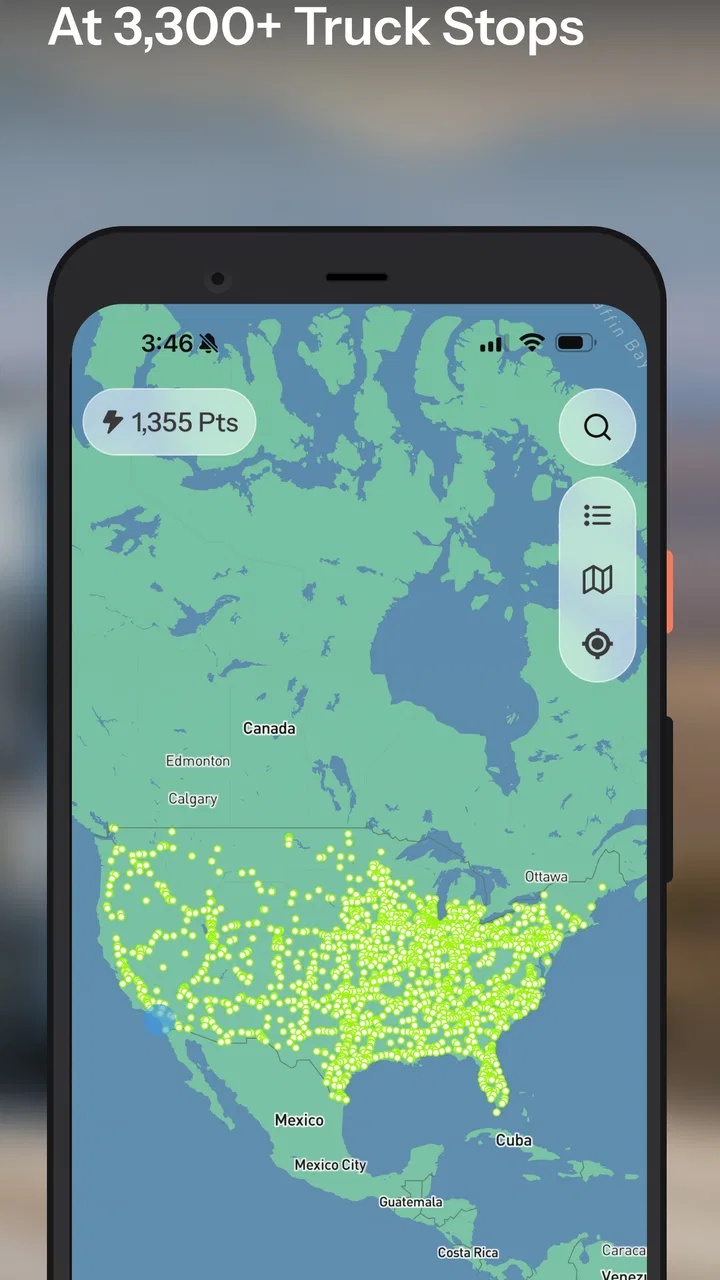
The app’s store summary points to more than three thousand truck stops, which gives the product a substantial working area rather than making it feel like a tool for one small region. I would still approach any map-based result as something to verify before committing to a stop. Fuel information and operating conditions can change, and a listing that looks attractive on screen may not fit the vehicle, route, or rest plan in front of me.
One useful habit is to check the app before the final approach, not while already maneuvering through traffic. I would use it during a planned break or before leaving a parking area, then make a simple decision: continue to the next suitable stop, or accept the current option. This reduces the number of visual choices I need to process when the road environment is demanding.
For users with reading difficulties, the focused subject matter is helpful, but it does not remove the need for clear confirmation. A fuel price, station identity, and route choice should be read slowly enough to avoid mixing up nearby locations. If I were helping another driver use it, I would encourage them to enlarge the phone’s system text where possible, keep the screen free of glare, and review the destination while stationary.
The app has earned a 4.4 average from around six hundred ratings, with more than two hundred written reviews. That level of response suggests that many people find the basic idea useful, but I would not treat the rating as a guarantee that every stop, device, or driving situation will feel equally clear. A map tool is highly dependent on context: screen size, lighting, connectivity, and the user’s familiarity with the route all affect the experience.
A practical workflow for reducing decisions
My preferred workflow is to begin with the route, then use Greenlane to identify possible diesel stops before fuel becomes urgent. I look for an option that fits naturally into a planned pause rather than chasing the lowest visible price at any cost. This is an important trade-off: a small saving may not be worthwhile if it adds a difficult turn, creates a long delay, or takes me away from a safer and more comfortable stopping pattern.
That approach also helps users who find rapid visual scanning tiring. Instead of repeatedly opening the app while moving, I would make one or two decisions in advance and keep the number of alternatives small. The app is more useful when it supports a calm plan than when it becomes another source of constant checking.
For a fleet manager or dispatcher, the value is different. Greenlane can help start a conversation about fuel-stop choices, but I would not use it as the only source for dispatch decisions. Vehicle restrictions, driver hours, delivery windows, preferred facilities, and current road conditions still belong in the wider planning process. Its strength is the fuel-saving angle, not complete operational management.
Motor, sensory, and situational considerations
Driving already divides attention between steering, mirrors, traffic, signs, radio communication, and changing road conditions. That makes hands-on phone use a serious limitation for almost any navigation app, including this one. I would only interact with Greenlane while parked or when a passenger can handle the screen. The app’s usefulness should never encourage a driver to read or tap while moving.
For someone with limited hand mobility, the most important question is not simply whether the app can be opened, but whether the whole planning task can be completed without repeated precise taps. A user may need to select a location, interpret the result, compare it with the route, and then transfer the decision to a preferred navigation method. That sequence can be manageable before departure, but frustrating if it has to be repeated under time pressure.
A passenger-assisted workflow may work well here. One person can operate the phone while the driver explains the preferred stop, or a driver can prepare the plan during a break and then rely on the vehicle’s normal navigation setup. This separates the fuel-price research from the physical act of driving, which is both safer and less demanding.
For users with low vision, the app’s map-based nature deserves caution. Maps often require distinguishing labels, markers, roads, and nearby choices, and that can be difficult on a small screen or in bright sunlight. I would not assume that a visually impaired driver can use it independently simply because the content rating is Everyone. The safer approach is to combine it with a trusted passenger, device-level display adjustments, and spoken guidance from a navigation system that the user already knows.
Users with color-vision differences may also prefer not to rely on visual color alone when comparing locations or judging which option is preferable. I would confirm the actual station name and location rather than interpreting a marker’s color as the entire decision. That is a small but important habit when the app is being used in unfamiliar areas.
Hearing-related needs create a different consideration. Greenlane’s central task is visual fuel-stop research, so a user who cannot hear spoken prompts is not automatically excluded from the basic planning purpose. However, the app should not be treated as a substitute for all visual road information, and I would keep route instructions, vehicle alerts, and roadside awareness in separate focus areas. A driver may need visual or tactile alternatives for those other parts of the journey.
For people with cognitive disabilities, fatigue, anxiety, or attention-related difficulties, the best use may be a very limited one: choose a stop before the trip, write down or save the decision through the normal phone workflow, and avoid making price comparisons during a complicated drive. The potential benefit is reduced uncertainty, but the opposite can happen if the user keeps searching for a marginally better deal. A clear personal rule, such as choosing the first suitable stop within the planned area, can make the tool less overwhelming.
What it is like during an ordinary driving day
Imagine I am driving a diesel vehicle on a long delivery run. I have enough fuel for several possible stops, but I want to avoid waiting until the tank is nearly empty. During a planned break, I open Greenlane, review truck-stop possibilities along the route, and identify one that appears to offer a better fuel choice. I then check whether the stop fits my vehicle and schedule before returning to the road.
The important part of that scenario is the timing. I am not trying to operate the app while approaching an exit. I am using it when I have the attention and physical freedom to compare options. This makes the product more inclusive for drivers who need extra time to read, for passengers assisting with the screen, and for anyone who finds rushed decisions difficult.
The same workflow can help a driver who is sensitive to noise or visual overload. Instead of exploring a busy area at the last moment, the driver can make the fuel decision in a quieter location and then focus on the road. That is a practical accessibility benefit created by the way the app is used, even though it does not replace dedicated accessibility tools.
There is also a useful trade-off for drivers with limited stamina. A cheaper stop is not automatically the best stop if reaching it requires a complicated detour, a difficult entrance, or extra walking through a large facility. I would weigh the fuel saving against the physical effort and stress involved. Greenlane can surface a possibility, but the driver still has to judge whether that possibility is genuinely suitable.
Where Greenlane fits beside familiar alternatives
Compared with a standard maps app, Greenlane is more specialized. A general map is usually better for broad place discovery, street-level route planning, traffic context, and combining several types of stops. Greenlane’s appeal is that diesel pricing and truck-stop decisions are placed closer to the center of the experience. If fuel cost is the main question, that specialization can save time.
Compared with a truck-focused navigation service, the balance may be different. A dedicated truck navigator may offer a wider collection of vehicle-specific routing considerations, while Greenlane’s clear identity is fuel savings at truck stops. I would use the two roles separately if needed: one tool to determine a safe and suitable route for the vehicle, and Greenlane to investigate where fueling may be more economical.
Compared with simply stopping at the next familiar station, the app encourages more deliberate planning. That can be valuable for frequent drivers, but it also introduces another decision layer. Someone who prefers predictable stops, has a strict schedule, or finds price comparison stressful may reasonably decide that convenience matters more than searching for a better deal.
The app is free, which lowers the barrier to trying it. Its audience is broad enough to include everyday diesel drivers, while the Everyone rating makes it suitable in age terms for general use. Still, “free” does not mean cost-free in practice: time spent comparing locations, possible detours, and the attention required to verify a choice all have value.
Remaining barriers and sensible limits
The biggest barrier is not the idea of fuel comparison; it is the environment in which the phone is used. A driver who needs large controls, strong contrast, voice interaction, or hands-free operation should test the complete workflow before depending on it. I would not make an accessibility assumption based only on the app’s age rating or its presence in a navigation category.
Another barrier is the gap between a listed truck stop and a stop that works for a particular person. A location may be unsuitable because of vehicle size, entrance layout, congestion, walking distance, restroom access, lighting, or the driver’s personal needs. Greenlane can support the financial part of the choice, but it cannot make every facility equally accessible or comfortable for every user.
Connectivity and changing information are practical concerns for any live map experience. I would avoid building a plan around one unverified result, especially in an unfamiliar area. Checking the location before departure and keeping a backup option in mind makes the app less fragile. This is particularly important for drivers who cannot easily stop and troubleshoot a phone in the middle of a route.
There is also a financial trap worth mentioning. A lower diesel price can feel like an obvious win, but the real calculation includes distance, idle time, tolls, fuel already burned on the detour, and the value of the driver’s scheduled break. I would use Greenlane to find candidates, then make a simple total-cost judgment rather than automatically choosing the smallest number on screen.
People who need a fully integrated navigation experience may find the separation between fuel research and route guidance inconvenient. If I want one application to handle every stage, from vehicle-aware routing to spoken directions and arrival planning, a broader navigation product may be a better primary tool. Greenlane works best as a focused layer in a larger routine.
The developer, Greenlane.ai, has positioned the app around a clear problem rather than trying to cover every travel need. That focus is a strength, but it also means the app should be judged on whether it makes diesel-stop planning easier, not on whether it replaces every other tool in a driver’s phone.
My inclusive verdict for everyday use
After looking at the app through different abilities and driving contexts, I see Greenlane as a practical specialist with a sensible place in a driver’s toolkit. It can make fuel planning more intentional, reduce the need to search through unrelated map results, and help frequent diesel users think beyond the next familiar stop.
I would recommend it most strongly to drivers who can plan while parked, have enough route flexibility to consider different truck stops, and care about the financial effect of repeated fueling decisions. It is also worth trying for passengers, dispatch support, and drivers who want a focused fuel-search companion beside their usual navigation app.
I would suggest skipping it as a primary solution if you need comprehensive truck routing, dependable hands-free interaction, or a single interface that handles every part of a journey. It is also not the right fit for someone who will be tempted to operate the phone while driving or who cannot comfortably verify map details without assistance.
Greenlane has passed ten thousand installs, and its free entry point makes experimentation easy. I would install it, test it during a stationary planning session, and decide whether its fuel-focused view fits my own route habits. The most inclusive way to use it is not to demand that it serve every driver identically, but to adapt the workflow: prepare early, use assistance when needed, verify the stop, and let the phone support the journey rather than compete with it.
My final view is that Greenlane - Fuel Smarter is most successful when it stays in that supporting role. It does not need to replace a familiar navigation system to be useful. For the right driver, especially one making frequent diesel-stop decisions, focused fuel planning can be a meaningful improvement. Its real limitation is that the final decision still depends on the road, the vehicle, the facility, and the person using it.
FAQs for Greenlane - Fuel Smarter
01What is Greenlane - Fuel Smarter and how does it work?
Greenlane - Fuel Smarter is designed to help drivers make more informed decisions about refueling and fuel costs. The app can use location-based information and trip-related details to help you find relevant fuel options, compare prices where data is available, and monitor spending. Its usefulness depends on the coverage and accuracy of local station information, so results may vary by country or region.
02Can Greenlane - Fuel Smarter help me find cheaper fuel nearby?
One of the app’s main purposes is helping users identify potentially cheaper fuel stations in their area or along a route. After enabling location access, you can review available stations and compare listed prices when supported. However, fuel prices can change quickly, and not every station may update its information immediately. Always confirm the displayed price at the pump before refueling.
03Does Greenlane - Fuel Smarter require location access?
Location access is generally important for getting the most useful experience from Greenlane - Fuel Smarter, especially when searching for nearby stations or planning fuel stops during a journey. You may be able to use some features without continuous location access, but manually entering a location may be necessary. For better privacy, review the app’s permission settings and choose only the access level you are comfortable with.
04Is Greenlane - Fuel Smarter free to download and use?
The availability of free features, premium tools, advertisements, or in-app purchases may depend on the current version of Greenlane - Fuel Smarter and your platform. Before downloading, check the official Google Play or App Store listing for pricing details, subscription information, and supported features. If payment is required for advanced options, review the renewal terms carefully before starting a trial or subscription.
05Are the fuel prices and station details in Greenlane - Fuel Smarter accurate?
Greenlane - Fuel Smarter can be useful for comparing fuel options, but its information should be treated as guidance rather than a guarantee. Station details and prices may come from external data sources, user contributions, or partner updates, and they can become outdated because of market changes, closures, or incorrect reports. Check the station’s current price, opening status, and accepted payment methods before making a detour.
Pros
- Helps compare nearby fuel prices before choosing a station.
- Can make regular commuting more cost-conscious over time.
- Useful for planning refueling stops on unfamiliar routes.
- Simple concept that is easy for most drivers to understand.
- May reduce unnecessary detours when searching for cheaper fuel.
Cons
- Fuel prices may be outdated or vary from the station’s actual price.
- Coverage and accuracy can differ depending on your location.
- Savings may not justify driving farther to another station.
- Requires location access for the most useful nearby-station results.
- Extra features may depend on regional availability or app updates.

Greenlane - Fuel Smarter
Gallery